WordPress vs Custom Websites: What Does Google Really Need to Index Your Website?
A website can look impressive, load quickly and function perfectly for visitors, but does that mean Google can find, understand and index its content?
Not necessarily.
Businesses today can choose from a wide range of website technologies, including WordPress, ASP.NET, React, Angular and fully custom-developed platforms. Each has advantages, but one important question is often overlooked during development: Has the website been built in a way that allows Google to discover and process its public content?
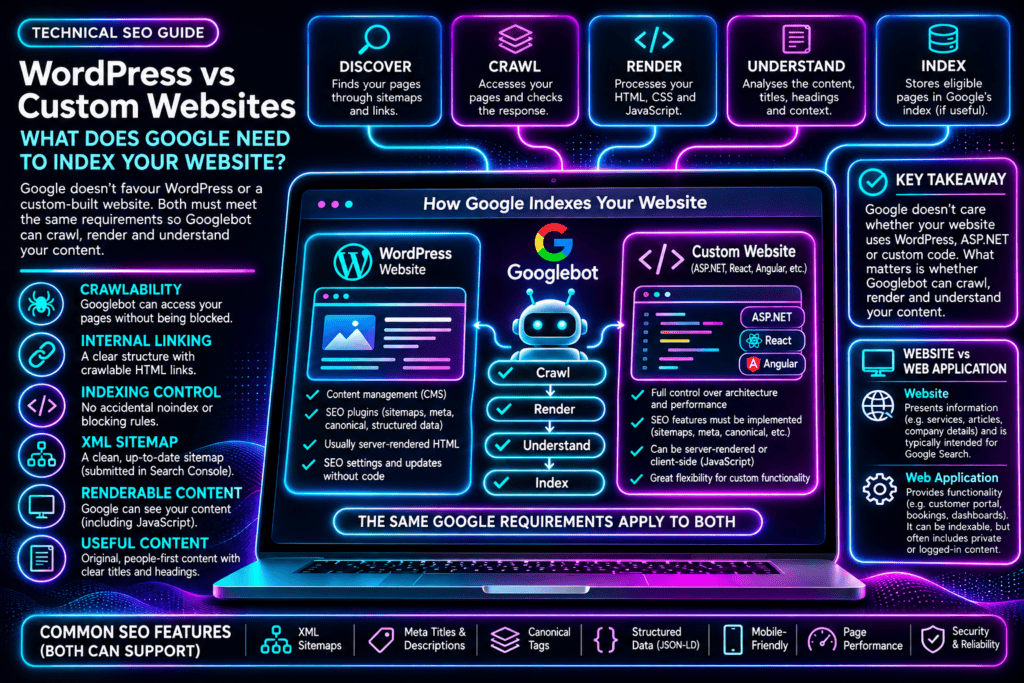
Google does not favour WordPress over custom-coded websites simply because of the technology used. The same fundamental crawling and indexing requirements apply regardless of the platform.
However, the way those requirements are implemented can differ significantly.
WordPress commonly provides content management, readable HTML, XML sitemaps and SEO configuration through its core functionality and plugins. Custom-developed websites can provide exactly the same capabilities, but the development team must ensure they are implemented correctly.
The difference becomes particularly important when a business replaces a traditional public website with a web application that relies heavily on JavaScript or dynamically generated content.
In this guide, Web Anatomy explains what Google needs to index a website, how WordPress and custom development compare, and why technical SEO should be considered before a website or application is launched.
Does Google Prefer WordPress or Custom Websites?
No. Google does not automatically favour WordPress, ASP.NET or any other website development platform.
Google’s systems evaluate the pages and content they can access, not whether the website was built using a particular content management system or programming framework.
According to Google’s technical requirements, a page must meet three basic conditions to be eligible for indexing:
- Googlebot must be able to access the page without being blocked.
- The page must return a successful HTTP 200 status code.
- The page must contain indexable content.
These are minimum technical eligibility requirements. Meeting them does not guarantee that Google will index a page or rank it prominently.
Other factors, including useful content, internal linking, website structure and technical SEO configuration, influence how effectively search engines discover and understand a website.
The real difference between WordPress and custom development is not what Google requires. It is how each platform delivers those requirements.
What Google Actually Needs to Index a Website
Whether a website uses WordPress, ASP.NET, React or another framework, the same core principles apply.
1. Crawlability: Google Must Be Able to Access Your Pages
Before Google can index a page, Googlebot needs to access it.
Crawling can be affected by server errors, firewall restrictions, robots.txt rules, authentication requirements and other technical barriers.
A public page intended for Google Search should generally be accessible without requiring a user to sign in.
Websites also need to return appropriate HTTP status codes.
A working page should normally return HTTP 200. Missing pages should return suitable error responses, such as HTTP 404 or 410.
Repeated server failures, incorrect redirects and other response problems can interfere with crawling.
For custom applications, developers should ensure that routing systems and server configurations return the correct response for each public URL.
2. Clear Internal Linking and Website Structure
Google discovers many pages by following links from pages it already knows.
A logical website structure helps search engines understand how pages relate to one another.
Important pages should be accessible through standard HTML links using an href attribute.
For example, a business offering several services should have separate, accessible pages for those services, connected through navigation and relevant internal links.
Some web applications use JavaScript click handlers to change the visible content without providing conventional crawlable links.
While these interfaces may work perfectly for visitors, they can make discovering individual pages more difficult for search engines.
For SEO, important public content should have meaningful URLs and accessible links.
3. Correct Indexing Directives
Website owners can control whether search engines are allowed to crawl or index particular content.
Two commonly used mechanisms are robots.txt and noindex directives.
A robots.txt file can restrict crawler access to specified paths or resources.
A noindex directive tells search engines not to include an accessible page in their index.
These controls serve different purposes.
For example, blocking a page through robots.txt can prevent Google from seeing a noindex directive placed on that page.
Incorrectly configured restrictions can prevent important service pages, articles or product pages from appearing in search results.
This can happen on WordPress and custom-built websites alike.
4. XML Sitemaps
An XML sitemap provides search engines with a list of important website URLs.
A sitemap is particularly useful for larger websites, newly launched websites and websites with content that may not be easily discovered through internal links.
WordPress includes basic XML sitemap functionality, while SEO plugins such as Yoast SEO and Rank Math offer additional sitemap management features.
Custom-developed websites may generate sitemaps through their framework, content management system or custom code.
Submitting a sitemap through Google Search Console helps Google discover URLs, but it does not guarantee that those pages will be crawled or indexed.
A sitemap should contain the intended canonical URLs and should not routinely include broken, redirected or deliberately non-indexable pages.
5. Renderable Content: Can Google See What Visitors See?
This is one of the most important considerations when comparing traditional websites with modern web applications.
A website can display content correctly in a visitor’s browser while requiring additional processing before Google can access that same information.
Traditional server-rendered websites commonly return HTML containing the page’s main content.
Some JavaScript applications initially return a small HTML document and rely on JavaScript to generate the visible page.
Google can execute JavaScript and render content, but problems can arise if scripts fail, resources are blocked or essential information depends on interactions that Google does not perform.
Developers need to ensure that important public content and links are available when Google processes the page.
6. Useful, Original Content
Technical accessibility makes a page eligible for indexing, but it does not automatically make the page valuable to search users.
Google’s search systems aim to surface helpful, reliable, people-first content.
A business website should explain its services clearly, answer relevant customer questions and provide useful information.
Important pages should also have descriptive HTML titles and clear headings.
Unique page titles and sensible heading structures help communicate the purpose of individual pages.
An H1 heading is useful for structure and clarity, although having exactly one H1 is not a strict Google indexing requirement.
7. Mobile-Friendly and Reliable Performance
A website should provide a usable experience on mobile devices.
Google primarily uses the mobile version of a website’s content for indexing.
Businesses should therefore ensure that important content, links and functionality are accessible on mobile devices.
Website speed, layout stability and responsiveness also contribute to user experience.
Core Web Vitals provide useful performance measurements, but passing Core Web Vitals is not a prerequisite for Google indexing.
A slow website may still be indexed, while a fast website may remain unindexed for entirely different reasons.
WordPress vs Custom Websites: How Do They Compare for SEO?
WordPress and custom-developed websites can both meet Google’s technical requirements.
The practical differences involve how SEO functionality is created, configured and maintained.
| SEO requirement | WordPress | Custom website |
|---|---|---|
| Crawlable pages | Commonly supported | Depends on architecture |
| HTML rendering | Typically server-rendered | Server-rendered or client-rendered |
| Page titles and descriptions | CMS or SEO plugins | CMS, framework or custom implementation |
| XML sitemap | Built-in or plugin-generated | Framework-generated or custom-built |
| Canonical tags | SEO plugins or theme functionality | Must be implemented appropriately |
| Structured data | Plugins or custom implementation | Custom or framework-based implementation |
| Internal links | Managed through content and navigation | Depends on routing and navigation |
| Google Search Console | Supported | Supported |
| Content management | Usually straightforward | Depends on the system |
| Indexing eligibility | Same Google requirements | Same Google requirements |
WordPress: SEO Management Made More Accessible
WordPress is widely used for business websites, blogs, service pages and content-driven platforms.
Its main advantage is that many common website management and SEO features are readily available.
Website owners can create new pages, update content, manage menus and publish articles without requiring developers to change application code for every update.
SEO plugins can help manage metadata, canonical tags, sitemaps and structured data.
However, WordPress does not guarantee good technical SEO.
Poor hosting, unnecessary plugins, bloated themes, incorrect indexing settings and badly configured caching can affect performance and search visibility.
WordPress still needs to be maintained, audited and optimised.
Custom Websites: Greater Control, Greater Implementation Responsibility
Custom-developed websites offer flexibility over functionality, architecture, integrations and performance.
Developers can create lightweight websites with precisely controlled HTML, routing and metadata.
They can also implement advanced features that may be difficult or inefficient to deliver through a conventional CMS.
However, the SEO requirements still need to be addressed.
Depending on the framework and architecture, the development team may need to implement or configure sitemaps, canonical tags, metadata, structured data, internal linking and appropriate HTTP responses.
Some frameworks provide these features directly or through established libraries, so they do not always need to be written from scratch.
The challenge arises when SEO is not included in the original development requirements.
A technically sophisticated application can be launched without the public-facing structure needed for effective search engine visibility.
Understanding the Difference Between a Website and a Web Application
A public business website and a web application often serve different purposes.
A business website is typically designed to present information to visitors.
It may include service descriptions, company information, articles, product pages, contact information and location-specific content.
These pages are often intended to attract visitors through Google Search.
A web application is primarily designed to provide functionality.
Examples include customer portals, booking platforms, financial dashboards, inventory management systems and interactive business tools.
Many applications require authentication or display personalised information.
That private content generally should not be indexed by public search engines.
However, a problem can arise when a business replaces its public marketing website with an application that was designed primarily around functionality rather than discoverable content.
The application may work perfectly for users while important public pages become difficult for Google to discover, render or index.
This is not a problem with web applications themselves.
It is a problem with failing to consider search engine requirements during application architecture and development.
ASP.NET Websites: Can Google Index Them Properly?
Yes. ASP.NET websites can be fully accessible and indexable by Google.
ASP.NET is a Microsoft framework used to develop websites, applications and business systems.
ASP.NET Core MVC and Razor Pages can generate complete HTML on the server, providing Google with accessible content.
A properly configured ASP.NET website can support descriptive URLs, metadata, canonical tags, XML sitemaps, structured data and crawlable internal links.
There is no inherent Google indexing disadvantage simply because the website uses ASP.NET.
The distinction becomes more important when an ASP.NET backend is combined with a JavaScript frontend.
For example, an application might use ASP.NET to provide data through an API while React or Angular generates the visible interface.
In this architecture, the development team must ensure that Google can access the public content and navigate between important pages.
Depending on the implementation, server-side rendering, static generation or other rendering strategies may be appropriate.
The solution depends on the application architecture, not merely the programming language.
Server-Side Rendering vs Client-Side Rendering
Understanding rendering helps explain why some custom websites experience technical SEO difficulties.
Server-Side Rendering
With server-side rendering, the server generates HTML before delivering the page to the visitor’s browser.
Important content, headings and links can already be present in the initial HTML response.
This reduces the need for search engines to execute JavaScript before accessing the main content.
Traditional WordPress websites commonly use this approach.
ASP.NET Core MVC, Razor Pages and modern JavaScript frameworks can also deliver server-rendered content.
Client-Side Rendering
With client-side rendering, the browser receives an initial HTML document and JavaScript generates much of the visible content.
This approach is common in interactive single-page applications.
It can provide responsive interfaces and advanced functionality, but it introduces additional dependencies when search engines need to process public content.
Google can render JavaScript, but developers must ensure that essential content and links become available during rendering.
An initially empty HTML application container does not automatically mean Google cannot index the page.
It does mean that the rendered result should be tested.
Static Generation and Hybrid Rendering
Some modern frameworks generate HTML pages in advance or combine server-rendered content with client-side functionality.
These approaches can make public content accessible while retaining interactive application features.
For businesses developing new platforms, the rendering strategy should be selected with both user requirements and search visibility in mind.
What Happens When a Business Replaces Its Website With a Web Application?
Replacing an existing website with a custom application can introduce SEO risks if the migration is not properly planned.
Consider a business with an established website containing separate service pages, articles and location pages.
These URLs may already appear in Google and attract organic traffic.
The business then commissions a new web application.
If the new system changes the URL structure, removes content, relies on inaccessible navigation or fails to implement appropriate redirects, Google may lose access to pages it previously understood.
Potential problems include:
- Important existing URLs disappearing without redirects.
- Multiple pages being replaced with a single application route.
- Missing page titles and canonical tags.
- JavaScript rendering failures.
- Incorrect HTTP status codes.
- Missing or outdated XML sitemaps.
- Accidental noindex directives.
- Changes to internal linking that make pages harder to discover.
These issues can also occur during WordPress redesigns and migrations.
The lesson is that website redevelopment should include a technical SEO migration plan, regardless of the platform being used.
Businesses should not assume that because a new website works correctly in a browser, its previous Google visibility will automatically be preserved.
Can You Use WordPress and a Custom Application Together?
Yes. For some businesses, combining a public-facing website with a separate application is an effective solution.
For example, a business may use WordPress for its homepage, service pages, articles and other marketing content.
An ASP.NET application could handle customer accounts, bookings, payments or specialised internal processes.
The public website focuses on publishing content and attracting visitors, while the application provides complex functionality.
This is not the only suitable architecture. A properly designed custom platform can perform both roles.
The important consideration is whether each part of the system meets its intended functional and search engine requirements.
How to Check Whether Google Can Index Your Website
Businesses experiencing indexing problems should investigate the website’s technical configuration before deciding to rebuild it.
Step 1: Review Google Search Console
Google Search Console provides information about crawling, indexing and website visibility.
The Page Indexing report can identify excluded URLs, server errors, noindex directives and other issues.
Step 2: Inspect Important URLs
Use the URL Inspection tool to check individual service pages, articles or other important URLs.
Review the indexing status, canonical information and any reported crawling problems.
Step 3: Test the Live Page
The live URL test can help identify current crawling and rendering issues.
For JavaScript applications, inspect the rendered HTML to confirm that important content is available.
Step 4: Compare the Original HTML With the Rendered Content
Check what the server initially returns and what becomes available after JavaScript execution.
This is particularly useful for React, Angular and other client-rendered applications.
Step 5: Check Internal Links
Confirm that important public pages have distinct URLs and can be reached through standard HTML links.
Step 6: Review Sitemaps and Indexing Directives
Check that the XML sitemap contains the correct URLs and that robots.txt, noindex directives and canonical tags are configured appropriately.
Step 7: Investigate Server and Application Errors
Review HTTP responses, JavaScript errors, blocked resources, API availability and relevant server logs.
A complete technical SEO audit should evaluate how the website operates as a system, not simply whether individual pages appear to work in a browser.
Can Google Indexing Problems Be Fixed Without Rebuilding the Website?
In many cases, yes.
A custom website experiencing indexing problems does not automatically need to be replaced with WordPress.
Depending on the architecture, developers may be able to improve server-side rendering, correct URL routing, implement metadata, generate sitemaps or resolve JavaScript rendering problems.
Other improvements may involve correcting HTTP responses, internal links, canonical tags and indexing restrictions.
Some applications may require more substantial architectural changes, particularly if they were originally designed without public search visibility in mind.
A technical SEO audit should identify the underlying causes before a business commits to redevelopment.
WordPress vs Custom Websites: Which Is Better for Your Business?
The correct choice depends on what the business needs the website to achieve.
WordPress is often practical for content-driven websites that need regular updates, service pages, articles and marketing functionality.
Custom development can be appropriate for specialised platforms, complex integrations, advanced workflows and business applications.
Both approaches can support excellent technical SEO.
The decision should consider functionality, development costs, maintenance, hosting, security, content management and search engine accessibility.
A website should not be selected solely because one platform is perceived as more modern or more SEO-friendly.
The best platform is the one that meets the business’s requirements while making its intended public content accessible to visitors and search engines.
Frequently Asked Questions
Does Google Prefer WordPress Over Custom Websites?
No. Google applies the same fundamental crawling and indexing requirements regardless of whether a website uses WordPress, ASP.NET or another development platform.
Can Google Index ASP.NET Websites?
Yes. ASP.NET websites can be fully indexable when they provide accessible public URLs, appropriate HTTP responses and indexable content.
Can Google Index React and Angular Applications?
Yes. Google can render JavaScript and index content from these applications. However, rendering failures, inaccessible navigation and other technical problems can affect indexing.
Does a Website Need an XML Sitemap to Be Indexed?
No. Google can discover pages through links without a sitemap. However, a well-maintained XML sitemap can assist with URL discovery.
Is Server-Side Rendering Required for Google SEO?
No. Google can process client-rendered JavaScript, but server-side rendering or static generation can reduce rendering dependencies and make important content more directly accessible.
Do Core Web Vitals Determine Whether Google Indexes a Website?
No. Core Web Vitals are performance and user experience measurements, not mandatory indexing requirements.
Why Is My Website Working but Not Appearing on Google?
Possible reasons include crawling restrictions, noindex directives, rendering failures, incorrect canonical tags, inaccessible content or Google’s decision not to index a particular page.
Should I Replace My Custom Website With WordPress?
Not necessarily. Many technical SEO problems can be corrected without replacing the existing platform. An audit should establish the cause before recommending a rebuild.
Is Your Website Built for Google to Find It?
A website can be technically advanced and still struggle to achieve visibility in Google Search.
For businesses investing in website development, search engine accessibility should be considered from the beginning rather than treated as an optional addition after launch.
At Web Anatomy, we help businesses investigate website indexing problems, technical SEO configuration, WordPress performance and search engine visibility.
Our website auditing services can assess crawlability, rendering, indexing directives, sitemaps, internal linking, metadata and other technical factors that influence how Google processes a website.
Whether your website is built using WordPress, ASP.NET or another custom development framework, the objective is the same: make important public content accessible, understandable and useful to search engines and visitors.
Is your website functioning correctly but struggling to appear in Google?
Contact Web Anatomy to discuss a technical SEO audit and identify potential issues affecting your website’s search visibility.
Last updated: 10 November 2026.