Best Website Builders for Small Businesses in 2027: Which Platform Should You Choose?
Choosing the right website builder is one of the most important decisions a small business can make when establishing or improving its online presence.
A business website needs to do more than look attractive. It should help customers find your services, understand what you offer, contact your business and, where appropriate, purchase products online.
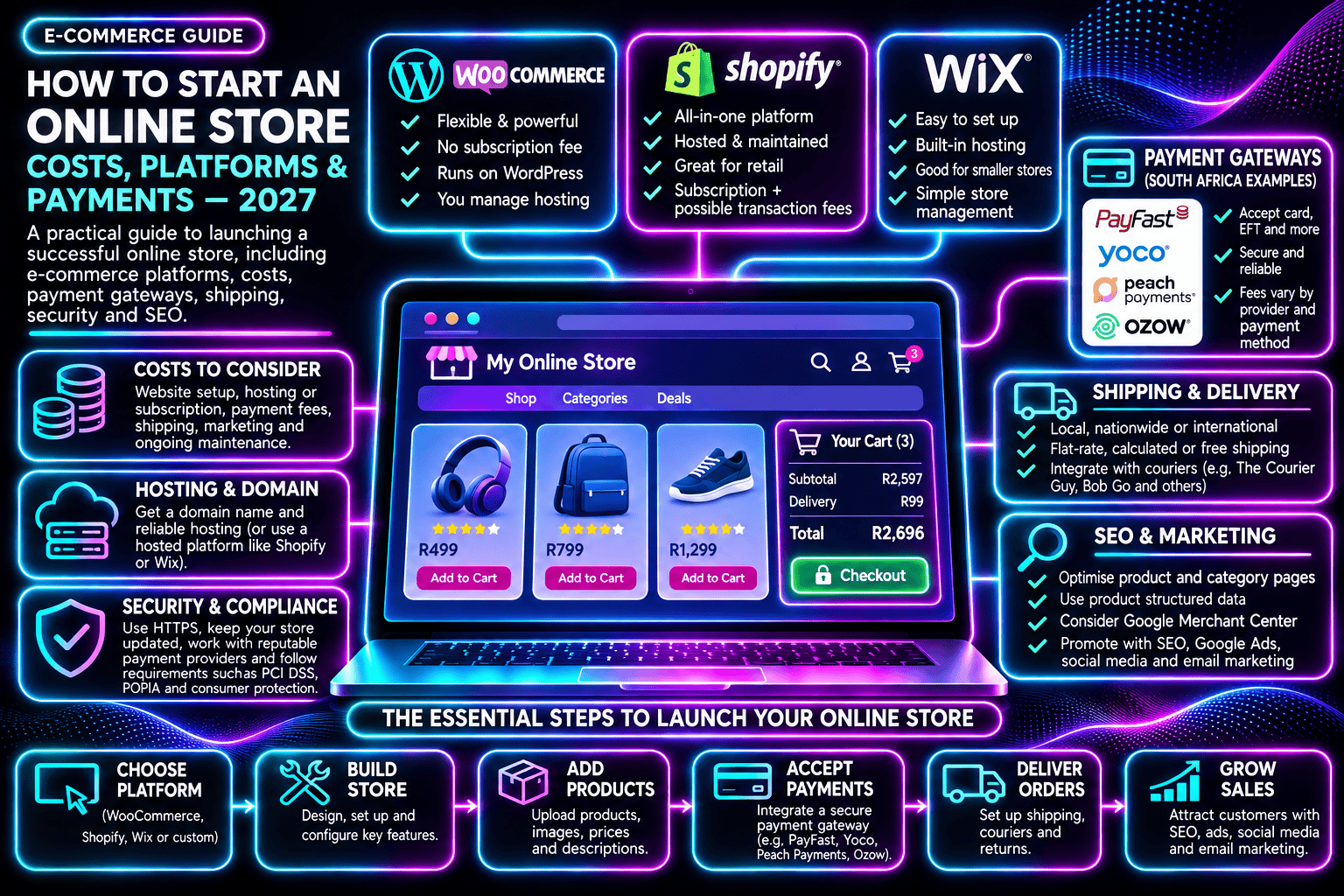
In 2027, small businesses have several established website-building options, including WordPress, Wix, Shopify, Squarespace and custom-developed websites. Each offers different levels of flexibility, convenience, ownership and ongoing maintenance.
But which website builder is actually best for your business?
The answer depends on what your website needs to achieve, how much control you want and how you plan to grow.
In this guide, Web Anatomy compares the leading website builders, explains their advantages and limitations, and explores what businesses should consider before choosing a platform.
What Is a Website Builder?
A website builder is a platform or system that helps businesses create and manage websites.
Some builders offer visual editors, templates and hosting in a single subscription. Others provide a content management system that can be installed on independent hosting.
There are also custom-developed websites, where developers use programming languages and frameworks to build a solution around specific business requirements.
Although these approaches differ, they share the same basic objective: creating a website that serves customers and supports the business.
The differences become important when considering functionality, costs, search engine optimisation, ongoing support and future expansion.
Best Website Builders for Small Businesses: Quick Comparison
| Platform | Best suited for | Main advantage | Main consideration |
|---|---|---|---|
| WordPress | Business websites, blogs and content marketing | Flexibility and content ownership | Requires maintenance |
| Wix | Small businesses wanting an easy editor | Convenient all-in-one platform | Platform-dependent |
| Shopify | Online stores and retail businesses | Dedicated e-commerce functionality | Subscription and transaction costs |
| Squarespace | Portfolios and design-focused websites | Templates and integrated tools | Less architectural flexibility |
| Webflow | Design-led marketing websites | Advanced visual design control | Learning curve and platform costs |
| Custom development | Specialised websites and applications | Tailored functionality | Development and maintenance requirements |
No single platform is the best choice for every business.
A small consulting company, online retailer and business developing a customer portal may have completely different requirements.
1. WordPress: Best for Flexibility and Content-Driven Websites
WordPress is a popular content management system used for business websites, blogs, service pages and online stores.
One of its biggest advantages is flexibility.
Businesses can create pages, publish articles, manage website navigation and expand functionality through plugins or custom development.
WordPress can also be hosted with a provider of your choice, allowing greater control over hosting arrangements and website infrastructure.
WordPress Advantages
WordPress provides a strong environment for businesses that regularly publish content or invest in search engine optimisation.
It supports structured page hierarchies, internal linking, metadata management, XML sitemaps and other common SEO requirements.
Plugins such as Yoast SEO and Rank Math can simplify technical SEO administration.
Businesses can also integrate forms, booking systems, analytics, customer management tools and e-commerce functionality.
For online stores, WooCommerce provides product management, checkout and payment integration capabilities.
WordPress Limitations
WordPress websites require ongoing maintenance.
Themes, plugins and WordPress itself need to be updated, monitored and kept secure.
Website performance can also be affected by poor hosting, unnecessary plugins, oversized images or inefficient themes.
A WordPress website is not automatically fast, secure or optimised for Google.
These outcomes depend on how the website is developed and maintained.
Who Should Choose WordPress?
WordPress is particularly suitable for service businesses, professional firms, content-driven websites, blogs and organisations that want flexibility over their hosting and future development.
Best for: Businesses wanting a flexible website that can grow alongside their content, marketing and functionality requirements.
2. Wix: Best for Beginners and Simple Business Websites
Wix provides an all-in-one website-building environment with hosting, templates and visual editing tools.
Businesses can build websites without managing separate hosting infrastructure or installing a traditional CMS.
Wix also offers AI-assisted website creation, business tools, appointment scheduling and e-commerce features on eligible plans.
Wix Advantages
Wix makes it relatively straightforward for beginners to create a professional-looking website.
Its visual editor allows users to adjust layouts, text, images and other elements without extensive coding knowledge.
Hosting and core platform maintenance are managed through the service.
This can be attractive for smaller businesses that want a simple website without managing technical infrastructure.
Wix Limitations
Wix is a hosted platform, so businesses operate within its available infrastructure and development ecosystem.
Although Wix supports many SEO requirements, it does not offer the same freedom to move the complete website architecture between independent hosting providers as a conventional self-hosted WordPress installation.
Businesses should also review subscription costs, feature limits and the requirements for exporting or rebuilding a website elsewhere.
Who Should Choose Wix?
Wix is a practical option for small businesses that want to create and manage a straightforward website with minimal technical involvement.
Best for: Small service businesses, startups and businesses prioritising convenience over extensive infrastructure control.
3. Shopify: Best for Dedicated Online Stores
Shopify is a commerce platform designed around selling products online.
It provides product management, inventory tools, checkout functionality, payment integrations and order administration.
Businesses can manage products and sales through a central dashboard.
Shopify Advantages
Shopify’s main strength is its e-commerce infrastructure.
Rather than assembling a store from multiple independent components, businesses can use an integrated platform designed for online retail.
Shopify also offers themes, apps, marketing integrations and reporting tools.
For businesses selling products through multiple channels, its commerce-focused functionality can be particularly valuable.
Shopify Limitations
Shopify involves ongoing subscription costs, and additional apps or transaction-related charges may increase the total operating cost.
Customisation is possible, but businesses need to work within Shopify’s platform architecture and available APIs.
Some advanced functionality may require specialist development or higher-tier plans.
Who Should Choose Shopify?
Shopify is particularly suitable for businesses whose primary objective is selling products online.
Best for: Retailers, product-based businesses and dedicated e-commerce stores.
4. Squarespace: Best for Portfolios and Design-Focused Businesses
Squarespace offers website templates, content management, hosting and integrated business features.
It is often considered by businesses that place a high priority on visual presentation.
Squarespace Advantages
Squarespace provides a structured website-building environment with professionally designed templates.
It can be suitable for businesses wanting to present photography, creative work, portfolios or service information.
Hosting and core platform infrastructure are managed within the subscription.
Squarespace Limitations
Squarespace offers less control over the underlying hosting environment than a self-hosted website.
Businesses requiring highly specialised functionality or complex integrations should check whether their requirements can be supported before committing.
Who Should Choose Squarespace?
Squarespace can be a good fit for photographers, designers, consultants and other businesses seeking a visually focused website with relatively straightforward management.
Best for: Portfolios, creative businesses and smaller brochure websites.
5. Webflow: Best for Design-Led Marketing Websites
Webflow provides a visual website development environment with advanced layout and design capabilities.
It can be used to create marketing websites, landing pages and content-managed websites.
Webflow Advantages
Webflow offers detailed visual control over layouts, responsive design and interactions.
It can be useful for businesses or agencies that want custom-looking designs without building every frontend component manually.
It also provides content management and hosting options.
Webflow Limitations
Webflow has a learning curve, particularly for users unfamiliar with website structure and responsive design principles.
Businesses should also review its subscription structure, content management limits and requirements for specialised functionality.
Who Should Choose Webflow?
Webflow is suited to design-focused businesses and marketing teams that need greater visual control.
Best for: Custom-designed marketing websites and landing pages.
6. Custom Website Development: Best for Specialised Requirements
Not every business website can be built efficiently using a conventional website builder.
Some organisations require specialised functionality, integrations, workflows or business applications.
Custom websites can be developed using technologies such as ASP.NET, PHP, React, Angular and other frameworks.
Custom Development Advantages
Custom development provides flexibility over website architecture and functionality.
A development team can create systems tailored to business processes, including customer portals, booking platforms, inventory systems and integrations with existing software.
Custom websites can also be designed with efficient code and appropriate performance strategies.
Custom Development Limitations
Custom development often involves higher initial costs and greater reliance on ongoing technical support.
Features such as content management, metadata, XML sitemaps and internal linking need to be included in the development requirements.
However, many modern frameworks provide tools or libraries that simplify implementing these features.
What About Google Indexing?
Google does not automatically favour WordPress over custom-developed websites.
Both must meet the same fundamental requirements for crawling, rendering and indexing.
An ASP.NET website can be fully indexable, while a poorly configured WordPress website can experience serious indexing problems.
The important consideration is how the website is built.
For more detail, read our guide to WordPress vs Custom Websites: What Does Google Really Need to Index Your Website?
Who Should Choose Custom Development?
Custom development is appropriate when the business has requirements that cannot be met effectively through conventional website-building platforms.
Best for: Specialised business systems, complex integrations and custom web applications.
Which Website Builder Is Best for SEO?
Search engine optimisation is an important consideration when choosing a website platform.
However, no website builder guarantees Google rankings.
Google evaluates factors including content relevance, accessibility, crawlability, indexing eligibility and overall page experience.
WordPress, Wix, Shopify, Squarespace, Webflow and custom-developed websites can all support search engine optimisation.
The practical differences involve how easily businesses can manage technical SEO settings, publish content and resolve problems.
For example, WordPress offers SEO plugins that simplify metadata and sitemap management.
Shopify provides SEO functionality designed around product and collection pages.
Wix includes SEO management tools within its hosted environment.
Custom websites can implement the same requirements, but the development team must ensure that they are correctly configured.
Businesses should evaluate whether their chosen platform supports accessible page URLs, crawlable internal links, unique titles, canonical tags, XML sitemaps and indexable content.
The platform matters less than the quality of its implementation and the usefulness of the website’s content.
Which Website Builder Is the Fastest?
Website speed depends on more than the website builder.
Hosting infrastructure, images, scripts, themes, plugins, caching and page complexity can all influence performance.
A lightweight WordPress website on suitable hosting may perform very well.
A custom-developed website may also achieve excellent performance when it is efficiently built.
Likewise, a hosted website builder can deliver reliable performance while still being affected by heavy page content or third-party integrations.
Google’s Core Web Vitals provide useful measurements for loading performance, responsiveness and visual stability.
Businesses should test real website pages rather than assuming that one platform is always faster than another.
How Much Does a Website Builder Cost?
The total cost of a business website involves more than the initial platform subscription.
Potential expenses include domain registration, hosting, premium templates, plugins or apps, payment processing, development, content creation, maintenance and technical support.
Some hosted builders bundle hosting and platform maintenance into a subscription.
Self-hosted WordPress websites typically require separate hosting and may involve premium software or professional support.
Custom-developed websites usually involve project-based development costs alongside ongoing hosting and maintenance.
Pricing also changes depending on subscription terms, location, currency and required features.
Businesses should compare the total cost over several years rather than focusing only on the advertised starting price.
A lower-cost website may be suitable for a small business with simple requirements, while a more substantial investment may be justified when the website supports significant sales or operational processes.
Website Ownership and Long-Term Flexibility
Website ownership is an important consideration that businesses sometimes overlook.
With a self-hosted WordPress website, businesses can generally move their website files and database between compatible hosting providers.
Hosted website builders operate within their own platforms, which may limit how easily a complete website can be transferred elsewhere.
Although content can often be exported, transferring the exact design and functionality may require rebuilding parts of the website.
Custom development offers flexibility, but businesses should clarify who owns the source code, design assets, domain name and hosting accounts.
Before commissioning a website, confirm that your business has appropriate administrative access and understands its rights to the website’s content and technical assets.
Questions to Ask Before Choosing a Website Builder
Before selecting a platform, consider the following:
- What is the main purpose of the website?
- Will the website need online payments or e-commerce?
- How frequently will content be updated?
- Who will manage the website after launch?
- Does the business need specialised integrations?
- How important is search engine visibility?
- What is the total ongoing operating budget?
- Can the website grow with the business?
- What happens if the business changes hosting providers or developers?
- Who is responsible for maintenance, security and backups?
Answering these questions can help prevent costly platform changes later.
Frequently Asked Questions
What Is the Best Website Builder for a Small Business?
There is no universal best option. WordPress is flexible for content-driven websites, Wix is convenient for simple websites, Shopify specialises in e-commerce and custom development suits specialised requirements.
Is WordPress Better Than Wix?
WordPress generally provides greater flexibility over hosting and development, while Wix offers an integrated platform with simplified website management. The better choice depends on the business’s requirements.
Is Shopify Better Than WooCommerce?
Shopify provides an integrated commerce platform, while WooCommerce offers e-commerce functionality within WordPress. Both can be suitable for online stores.
Can a Website Builder Rank on Google?
Yes. Websites created using established builders can rank in Google when their pages are accessible, indexable and provide useful content.
Do I Need a Developer to Build a Business Website?
Not always. Many website builders support no-code creation. However, professional development can be valuable for custom functionality, integrations, technical SEO and long-term maintenance.
Can I Change Website Platforms Later?
Yes, but migrating between platforms may require rebuilding designs, transferring content, configuring redirects and checking technical SEO settings.
Is a Custom Website Better for SEO?
Not automatically. Custom development provides architectural control, but SEO requirements still need to be implemented correctly.
Choosing the Right Website Platform for Your Business
The best website builder is not necessarily the most expensive, the easiest to use or the one with the most features.
It is the platform that supports your business requirements, provides a reliable experience for visitors and can be managed effectively over time.
For some businesses, a straightforward hosted website builder will be sufficient.
Others may benefit from the flexibility of WordPress, the e-commerce functionality of Shopify or the specialised capabilities of custom development.
At Web Anatomy, we help businesses evaluate website requirements, develop and manage WordPress websites, investigate technical SEO issues and improve existing website performance.
Whether you are planning a new business website or reviewing an existing platform, the objective should be to create a website that supports your business today and remains practical to manage as your needs evolve.
Need help choosing or improving your business website?
Contact Web Anatomy to discuss website development, hosting, maintenance and technical SEO services.